

Course Materials
All materials required to follow the online course are provided in electronic format.
VMware vSphere is everywhere! Traditional data centers are a thing of the past, and if you want to understand virtual data centers, VMware vSphere is the first step. Flexibility, agility, and scalability are the key benefits of virtualization offered by VMware vSphere. From individual virtual machines to fully manageable resource pools, VMware vSphere provides the best starting point for virtual data centers.
x86 servers have become a limited resource today and can no longer handle large amounts of information, while data is now processed and delivered to servers very quickly.
As a result, IT organizations have had to use more servers running at only part of their capacity in order to keep up with this data flow. Unfortunately, this increased costs and reduced efficiency.
With virtualization, companies can rely on cloud-based software that replaces physical servers to create a virtual server system. In practice, multiple virtual machines can run on a single server. It is more affordable and efficient than trying to buy more machines in a single environment.
vSphere plays a central role in server virtualization.
VMware vSphere is a virtual platform designed to transform physical resources into virtual ones so that IT resource utilization is as high as possible, making administration easier, improving data security, and giving systems greater resilience to unexpected failures.
This course enables system engineers and administrators to install, configure, and manage the VMware vSphere environment. After completing the course, participants will be fully prepared to apply these services in the infrastructure of organizations of any size, including the ESXi hypervisor and vCenter.
The course prepares you for administering VMware vSphere infrastructure and provides a foundation for working with other VMware technologies within the software-defined data center.
VMware is a leading multi-cloud service provider for all applications, enabling digital innovation. Over the past 10 years, VMware has become a leader in virtualization thanks to its software solutions. Given the market coverage of VMware products, there is also a growing need for highly trained system engineers who can take full advantage of this technology.
The chart below shows the salaries of certified system engineers.
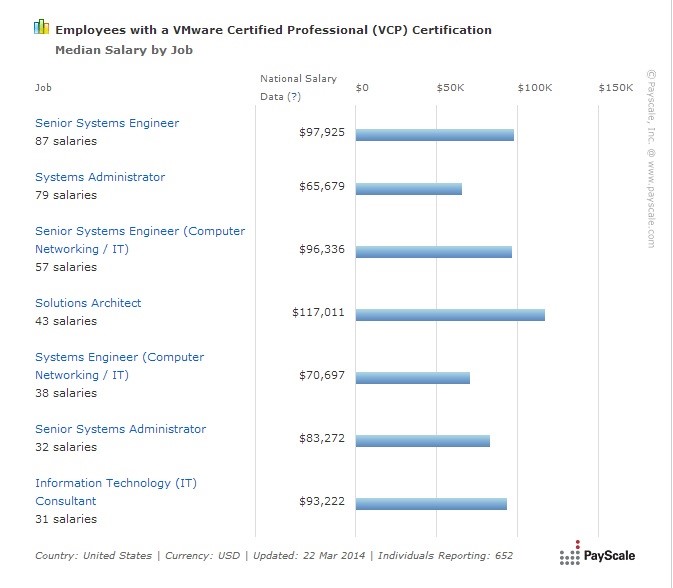
Source: Payscale in the United States, in dollars.
Basic knowledge of PC hardware and familiarity with client-side Windows operating systems, Windows 10 or Windows 11. Prior experience working with and maintaining Microsoft operating systems and Microsoft Windows Server is required, as well as knowledge of the basic functions of VMware virtualization software.
IT Centar wants to provide its participants with comprehensive knowledge so they can become more competitive in the job market. Knowing that one training course is not enough to get employed, IT Centar offers special discounts to participants who invest time and money in education, which can be used for related training courses.
All candidates who complete the VMware vSphere training at IT Centar will receive a voucher that can be used for one of the networking courses (CCNA or CCNP, as well as Linux courses).
All materials required to follow the online course are provided in electronic format.
Upon completing the course, participants receive an IT Centar certificate confirming successful completion of the training.
Basic computer skills are required to attend the course and obtain the certificate. Knowledge of English is recommended.
We guarantee that you’ll gain the essential skills you need. If you still feel unsure after completing the course, we’ll give you another opportunity — you can attend the course again free of charge during the next enrollment period.

System Administrator/DevOps
This training is led by Dušan Petrović, an expert who brings firsthand experience from the front lines of DevOps engineering into the classroom.
His approach is defined by exceptional attention to detail and a deep understanding of each participant’s specific needs, ensuring that no one is left without an answer to complex technical questions.
Specialist Structural Engineer in Electrical Engineering and Computing
System Administrator/DevOps
This training is led by Dušan Petrović, an expert who brings firsthand experience from the front lines of DevOps engineering into the classroom.
His approach is defined by exceptional attention to detail and a deep understanding of each participant’s specific needs, ensuring that no one is left without an answer to complex technical questions.
Treninzi koje drži
Pošalji prijavu i naš tim će ti se javiti sa slobodnim terminima, formatom nastave i preporukom pripreme.