

Course Materials
All materials required to follow the online course are provided in electronic format.
The Windows Server 2019 Administrator course is designed for professionals responsible for deploying, maintaining, and supporting Windows Server 2019 servers in a corporate environment. This course is also essential for individuals who want to become network administrators, network engineers, system administrators, IT engineers, information systems administrators, or technical support specialists. After completing the Windows Server 2019 Administrator course, participants demonstrate that they have all the skills needed for successful implementation, management, and troubleshooting of network systems based on the Microsoft Windows Server 2019 environment.
The Windows Server 2019 Administrator course is designed for professionals who deploy, manage, and troubleshoot existing network and system environments based on Microsoft Windows Server 2019 platforms.
More than 80% of computers run the Microsoft operating system.
Server systems often form a critical part of day-to-day operations for any business. The systems engineer’s job is to support hundreds or thousands of users across 2 to 100 locations. Network services and resources include messaging, databases, files and printers, proxy servers or network firewalls, Internet and intranet, remote access, and client computer management.
Connectivity needs include connecting branch offices and individual users at remote locations to the corporate network, as well as connecting the corporate network to the Internet.
Take a closer look at our new course closely related to Windows Server 2019: the VMware vSphere course, which you can also find here.
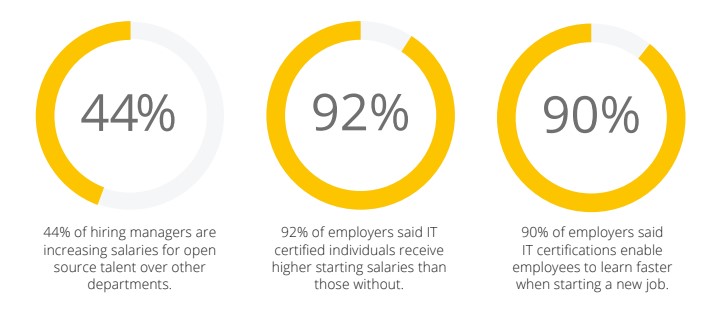
Microsoft is a company that, over the past several decades, has taken the lead in systems software design thanks to its software solutions. Today, the company’s software solutions cover more than 85% of the global market. Given the widespread use of Microsoft products, there is also a need for highly trained systems engineers who can make the most of this technology. The chart below shows the advantage of certified systems engineers. This information is taken from the Open Source Jobs Report, 2016 and
CompTIA HR Perceptions of IT Training and Certification Study, 2015.
Basic knowledge of PC hardware and familiarity with using client Windows operating systems such as Windows 7, Windows 8, Windows 8.1, or Windows 10. Previous experience working with and maintaining the Microsoft operating system is recommended, but not required.
IT Centar wants to provide its participants with comprehensive knowledge so they can become more competitive in the job market. Knowing that one training alone is not enough to get hired, IT Centar wants to help participants who invest their time and money in education through special discounts that can be used for related courses. All candidates who complete the MCSA training at IT Centar will receive a voucher they can use for one of the networking courses (CCNA or CCNP).
All materials required to follow the online course are provided in electronic format.
Upon completing the course, participants receive an IT Centar certificate confirming successful completion of the training.
Basic computer skills are required to attend the course and obtain the certificate. Knowledge of English is recommended.
We guarantee that you’ll gain the essential skills you need. If you still feel unsure after completing the course, we’ll give you another opportunity — you can attend the course again free of charge during the next enrollment period.

System Engineer, DevOps
An experienced DevOps engineer with many years of work across a wide range of IT projects. He is a top-tier Linux systems expert, but what truly sets him apart is his ability to explain complex things in a simple, practical way, preparing you for real challenges on the job.
Master of Electrical Engineering and Computer Science
System Engineer, DevOps
An experienced DevOps engineer with many years of work across a wide range of IT projects. He is a top-tier Linux systems expert, but what truly sets him apart is his ability to explain complex things in a simple, practical way, preparing you for real challenges on the job.
Treninzi koje drži
Everything is excellent. The instructor is dedicated to the course and adapts to each participant. In private as well, if someone has a problem with the equipment or a topic related to the course, he is always ready to help. Excellent, I’m thrilled!
A truly comprehensive and in-depth course, easy to understand even for beginners. I would recommend it to anyone who wants to start a career in IT.
All praise, and I hope I’ll soon pass all the MCSA exams so I can move on to CCNA, of course again at IT Centar 😊.
Pošalji prijavu i naš tim će ti se javiti sa slobodnim terminima, formatom nastave i preporukom pripreme.